Final Porosity Lens
Link : http://www.youtube.com/watch?v=reV0Bg1ElZ8
Friday, November 5, 2010

EXP2_Week6 :Text on tutorial (continue)
Research (tutorial) Assignment - First draft paragraphs (continue)
The main subject of the tutorial will be focusing on AI nodes which involve in most of the action of the AI (character). There are a number of tutorial on the public source such as internet that show you how to create the action. After some research and having experiences of being a person who watch those tutorial before so I decided to create the tutorial that combine the movement of AI, Entity and AI behavior by using flowgraph nodes. I will demonstate the tutorial that take the audience each steps to complete the process of how to create an action.
In addition, throught out the tutorial I will be demonstarting some of the trick of how to use basic tool. Me, as a student who was first introduced to this program at the beginning of the course found quite a number of problem in using some basic tools. I will set a topic in the tutorial on this subject however thoughtout the tutorial that will be shown, a number of technique on basic tools will be shown as well. The tutorial will be presented in written text along the video.
The main subject of the tutorial will be focusing on AI nodes which involve in most of the action of the AI (character). There are a number of tutorial on the public source such as internet that show you how to create the action. After some research and having experiences of being a person who watch those tutorial before so I decided to create the tutorial that combine the movement of AI, Entity and AI behavior by using flowgraph nodes. I will demonstate the tutorial that take the audience each steps to complete the process of how to create an action.
In addition, throught out the tutorial I will be demonstarting some of the trick of how to use basic tool. Me, as a student who was first introduced to this program at the beginning of the course found quite a number of problem in using some basic tools. I will set a topic in the tutorial on this subject however thoughtout the tutorial that will be shown, a number of technique on basic tools will be shown as well. The tutorial will be presented in written text along the video.
EXP2_Week6: Developed structure (textures)
Developed structure
This is the video showing the final structure of the sketch installation with light and texture. The video showing the interior and exterior structure.
The sketch installation is kept into the simple train station however the structure that being place allow light to give a great effect.
Link: http://www.youtube.com/watch?v=V6s9s_k5Jjg
This is the video showing the final structure of the sketch installation with light and texture. The video showing the interior and exterior structure.
The sketch installation is kept into the simple train station however the structure that being place allow light to give a great effect.
Link: http://www.youtube.com/watch?v=V6s9s_k5Jjg
EXP2_Week4: Paragraphs on tutorial
Research (Tutorial) Assignment - First draft paragraph
Thoughtout the course BENV2423 the students had established the knowleage of how to use an environment interactive program, Sandbox 2 Editor. Starting from how to create basic map or which we can call it "land" to the technique and some tricks to give command of action to character in the environment, or basicly a "game".The course focus on the interaction of people to the enviroment therefore in this final research assignment I will be conducting a video tutorial on the basic action of the people such as moving into given direction, getting into the vehicle, setting some behaviour and moving a vehicle. These actions aare the basic action that most of people involve with everyday and all of the skill involve in this has been great implement through out the course.
The tutorial will focus into command the action by using flowgraph. There will be quite a number of flow of flowgraph nodes go into this tutorial. Such as, AI:GoToSpeedStance, Vehicle:Entre, AI:Excecute, Enity:EntityPro as an example.
Thoughtout the course BENV2423 the students had established the knowleage of how to use an environment interactive program, Sandbox 2 Editor. Starting from how to create basic map or which we can call it "land" to the technique and some tricks to give command of action to character in the environment, or basicly a "game".The course focus on the interaction of people to the enviroment therefore in this final research assignment I will be conducting a video tutorial on the basic action of the people such as moving into given direction, getting into the vehicle, setting some behaviour and moving a vehicle. These actions aare the basic action that most of people involve with everyday and all of the skill involve in this has been great implement through out the course.
The tutorial will focus into command the action by using flowgraph. There will be quite a number of flow of flowgraph nodes go into this tutorial. Such as, AI:GoToSpeedStance, Vehicle:Entre, AI:Excecute, Enity:EntityPro as an example.
EXP2_Week4: Developed 3 video clips of flowgraph nodes + Developed model with lights
Developed Video clips (Chisen flowgraph nodes)
As further research is taken placed and mode thought about EXP2 came through, I then re-considered of what flowgraph nodes I will be using in Porosity Lens. As the concept of exp2 is to present how people interact with environment and observe the time when people travel throught space. The 3 flowgrph nodes I chose are as follow;
1. Vehicle:Entre
Link: http://www.youtube.com/watch?v=w3ysPABIRa8
This flowgraph node give command to AI to get into the Vehicle (Truck in this video). With implementation with AIpath and AI:FollowPathSpeedStance, the vehicle then moving in the given path direction. When that action is secceeded the node Vehicle:Exit is used to command AI or player to get out of vehicle. In this video it shows how example of these nodes I applied. Travelling time on the vehicle is one of the most important part of how people travel thourh and interact with spaces or environment. So I decided to put this part of action into my Porosity Lens.
2. AI:GoToSpeedStance
Link: http://www.youtube.com/watch?v=DBDWaDI30q8
In this video it shows how AI:GoToSpeedStance command the action of AI . AI is commanded to move in the spot direction that were given by AITagPoint. The implementation of Entity:EntityPos is also applied. As I need to find the position of the entity for the AI to move to. The video shows how the AI move from one spot to another with the amount of time is take. This action can be implemented to the Porosity Lens as I will be putting this action into train station showing people walking around though the environment.
3. Game:LocalPlayer
Link: http://www.youtube.com/watch?v=ZdH2Af-0QPw
For this video, the Game:LocalPlayer node is added.It is used to command the AI to follow the player (me). This action is formed by AI:GoToStanceSpeed as the node give to command to AI to move and Game:LocalPlayer is the command to VI to move to the local player(me). The video showing AIs following playyer(me). This will be useful to show how people walk in the space or area that I walk through.(Assuming this area to be the most recent area people walk through). This present the time consumption and the interaction between people and place.
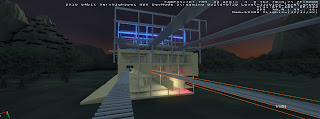
Developed model
Here I have changed some part of the model to fit into the train station and also placed some light in the model...


As further research is taken placed and mode thought about EXP2 came through, I then re-considered of what flowgraph nodes I will be using in Porosity Lens. As the concept of exp2 is to present how people interact with environment and observe the time when people travel throught space. The 3 flowgrph nodes I chose are as follow;
1. Vehicle:Entre
Link: http://www.youtube.com/watch?v=w3ysPABIRa8
This flowgraph node give command to AI to get into the Vehicle (Truck in this video). With implementation with AIpath and AI:FollowPathSpeedStance, the vehicle then moving in the given path direction. When that action is secceeded the node Vehicle:Exit is used to command AI or player to get out of vehicle. In this video it shows how example of these nodes I applied. Travelling time on the vehicle is one of the most important part of how people travel thourh and interact with spaces or environment. So I decided to put this part of action into my Porosity Lens.
2. AI:GoToSpeedStance
Link: http://www.youtube.com/watch?v=DBDWaDI30q8
In this video it shows how AI:GoToSpeedStance command the action of AI . AI is commanded to move in the spot direction that were given by AITagPoint. The implementation of Entity:EntityPos is also applied. As I need to find the position of the entity for the AI to move to. The video shows how the AI move from one spot to another with the amount of time is take. This action can be implemented to the Porosity Lens as I will be putting this action into train station showing people walking around though the environment.
3. Game:LocalPlayer
Link: http://www.youtube.com/watch?v=ZdH2Af-0QPw
For this video, the Game:LocalPlayer node is added.It is used to command the AI to follow the player (me). This action is formed by AI:GoToStanceSpeed as the node give to command to AI to move and Game:LocalPlayer is the command to VI to move to the local player(me). The video showing AIs following playyer(me). This will be useful to show how people walk in the space or area that I walk through.(Assuming this area to be the most recent area people walk through). This present the time consumption and the interaction between people and place.
Developed model
Here I have changed some part of the model to fit into the train station and also placed some light in the model...


Subscribe to:
Posts (Atom)