Porosity Lens FIRST Draft
Link : http://www.youtube.com/watch?v=vxk1W9veKOw
Friday, November 5, 2010

EXP2_Week4: Developed 3 video clips of flowgraph nodes + Developed model with lights
Developed Video clips (Chisen flowgraph nodes)
As further research is taken placed and mode thought about EXP2 came through, I then re-considered of what flowgraph nodes I will be using in Porosity Lens. As the concept of exp2 is to present how people interact with environment and observe the time when people travel throught space. The 3 flowgrph nodes I chose are as follow;
1. Vehicle:Entre
Link: http://www.youtube.com/watch?v=w3ysPABIRa8
This flowgraph node give command to AI to get into the Vehicle (Truck in this video). With implementation with AIpath and AI:FollowPathSpeedStance, the vehicle then moving in the given path direction. When that action is secceeded the node Vehicle:Exit is used to command AI or player to get out of vehicle. In this video it shows how example of these nodes I applied. Travelling time on the vehicle is one of the most important part of how people travel thourh and interact with spaces or environment. So I decided to put this part of action into my Porosity Lens.
2. AI:GoToSpeedStance
Link: http://www.youtube.com/watch?v=DBDWaDI30q8
In this video it shows how AI:GoToSpeedStance command the action of AI . AI is commanded to move in the spot direction that were given by AITagPoint. The implementation of Entity:EntityPos is also applied. As I need to find the position of the entity for the AI to move to. The video shows how the AI move from one spot to another with the amount of time is take. This action can be implemented to the Porosity Lens as I will be putting this action into train station showing people walking around though the environment.
3. Game:LocalPlayer
Link: http://www.youtube.com/watch?v=ZdH2Af-0QPw
For this video, the Game:LocalPlayer node is added.It is used to command the AI to follow the player (me). This action is formed by AI:GoToStanceSpeed as the node give to command to AI to move and Game:LocalPlayer is the command to VI to move to the local player(me). The video showing AIs following playyer(me). This will be useful to show how people walk in the space or area that I walk through.(Assuming this area to be the most recent area people walk through). This present the time consumption and the interaction between people and place.
Developed model
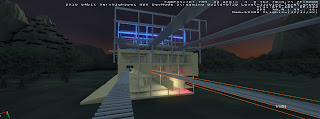
Here I have changed some part of the model to fit into the train station and also placed some light in the model...


As further research is taken placed and mode thought about EXP2 came through, I then re-considered of what flowgraph nodes I will be using in Porosity Lens. As the concept of exp2 is to present how people interact with environment and observe the time when people travel throught space. The 3 flowgrph nodes I chose are as follow;
1. Vehicle:Entre
Link: http://www.youtube.com/watch?v=w3ysPABIRa8
This flowgraph node give command to AI to get into the Vehicle (Truck in this video). With implementation with AIpath and AI:FollowPathSpeedStance, the vehicle then moving in the given path direction. When that action is secceeded the node Vehicle:Exit is used to command AI or player to get out of vehicle. In this video it shows how example of these nodes I applied. Travelling time on the vehicle is one of the most important part of how people travel thourh and interact with spaces or environment. So I decided to put this part of action into my Porosity Lens.
2. AI:GoToSpeedStance
Link: http://www.youtube.com/watch?v=DBDWaDI30q8
In this video it shows how AI:GoToSpeedStance command the action of AI . AI is commanded to move in the spot direction that were given by AITagPoint. The implementation of Entity:EntityPos is also applied. As I need to find the position of the entity for the AI to move to. The video shows how the AI move from one spot to another with the amount of time is take. This action can be implemented to the Porosity Lens as I will be putting this action into train station showing people walking around though the environment.
3. Game:LocalPlayer
Link: http://www.youtube.com/watch?v=ZdH2Af-0QPw
For this video, the Game:LocalPlayer node is added.It is used to command the AI to follow the player (me). This action is formed by AI:GoToStanceSpeed as the node give to command to AI to move and Game:LocalPlayer is the command to VI to move to the local player(me). The video showing AIs following playyer(me). This will be useful to show how people walk in the space or area that I walk through.(Assuming this area to be the most recent area people walk through). This present the time consumption and the interaction between people and place.
Developed model
Here I have changed some part of the model to fit into the train station and also placed some light in the model...


EXP2_Week3: Sketch Installation
Images from Google SketchUp
The Sketch Installation is modeled upon the BENV2423 STRUCTURE model. It was design to fit the structure, representing a platform of train station. The seats and stairs are made for passenger who will be passing through.


Images for Crysis Environment


Video
Thursday, November 4, 2010
EXP2_Week2: Research (continue)
I've found more tutorial on youtube which may be helpful in my porosity lens. The tutorial shows how to use flowgraph to implement the different movement and action in crysis environment.
- Transporting AI by vehicle
http://www.youtube.com/watch?v=gF_Sd4jtPmU
- Make a moving train
http://www.youtube.com/watch?v=vB3y98yKIXY
-AI walk in the building
http://www.youtube.com/watch?v=9g37kcx7J24
-some AI behaviour
http://www.youtube.com/watch?v=vQIGxrq22n8&feature=related
- Transporting AI by vehicle
http://www.youtube.com/watch?v=gF_Sd4jtPmU
- Make a moving train
http://www.youtube.com/watch?v=vB3y98yKIXY
-AI walk in the building
http://www.youtube.com/watch?v=9g37kcx7J24
-some AI behaviour
http://www.youtube.com/watch?v=vQIGxrq22n8&feature=related
EXP2_Week2: Porosity Lens Brief
"Porosity Lens" Brief - 250 words
As the terms “Porosity Lens” in this case means the way to understand peoples navigate through environment, by flowgraph nodes. Base on the research on my chosen flowgraph node, my Porosity Lens will present the different in time that people spent in different place and situation.
The movement and speed will be the significant part of this idea. Flowgraph node that allows me to control the direction, movement and speed will give the great result to show the “time” that people spend in environment. Not just in the building or train station but also in vehicle which is considered to be part of an environment. Therefore in the Porosity Lens, it will be about the movement and speed shown by people in station and car or even a train which is result in an amount of time.
We will be able to observe how people are transported through space and how much time they spend on each different space. The flowgraph nodes that I have chosen will allow me to do so. Focusing on the particular one such as Vehicle:Entre, I believe this will show me how do people get into the vehicle and much do time do they spend. Following by the Movement:MoveEntityTo node that will command people to walk from one sport to other spot which allows me again to observe their behaviour and so their interaction to environment. And flowgraph node, Input:Key may be applied in Porosity Lens to allow me to control some factors that may effects people behaviour on their interaction with environment.
EXP2_Week2: Third 30 seccond video clip
The last 30 sec video clip shows the example of the use of flowgraph Input:Key node to command the entity to move when the playerpress the key. In this video the light is an entity. When he player press key "h" (for example) the light move and when press other the other light move.
Link : http://www.youtube.com/watch?v=B7slo1w6ZIQ
EXP2_Week2: Second 30 section video clip
The 30 second video clip shows the example of entities moving in the given direction and give speed. It represents the movement of rotation and linere line regarding the chosen flowgraph note of mind Movement:MoveEntityTo and Movement:RotateEntityTo.
Link:http://www.youtube.com/watch?v=DHGQUaABdoU
Subscribe to:
Posts (Atom)